How Can We Help?
Timesheet – Main Page
Introduction
‘Timesheet’ can be used to track and manage employees’ working hours. If an employee has forgotten to clock in or clock out, the employer can edit the hours manually.
How to enter ‘Timesheet’ main page?
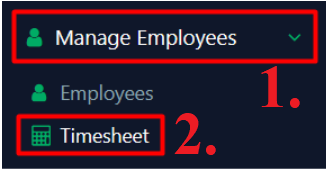
To enter ‘Timesheet’ main page, follow the following steps:
- Click ‘Manage Employees’ on the left side panel.
- Click ‘Timesheet’ from the dropdown menu.
How to view a ‘Timesheet’?
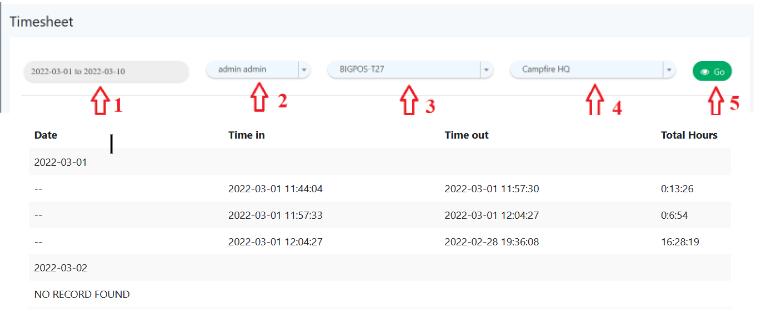
To view a ‘Timesheet’, follow the following steps:
- Select ‘date range’ to be inspected
- Select ‘employee’ to be inspected
- Select ‘terminal’ to be inspected
- Select ‘branch’ to be inspected
- Click ‘
 ’ to view timesheet