How Can We Help?
Stock Return – Main Page
Introduction
Stock Return allow users who may want to return faulty or incorrect stock items to suppliers. With this feature, users can manage stocks to be delivered back to suppliers.
Notes: Items need to have an assigned supplier before it is returned back to a supplier.
How to enter ‘Stock Return’ Page?
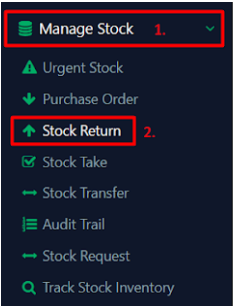
To enter ‘Stock Return’ page, follow the steps:
- First, click on ‘Manage Stock’ on the left panel
- Click ‘Stock Return’ from the dropdown menu