How Can We Help?
QR Menu Payment Setting
Introduction
The payment settings for various countries (Malaysia/Singapore) vary somewhat in the QR menu.
How to enable QR Menu Payment (Malaysia)?
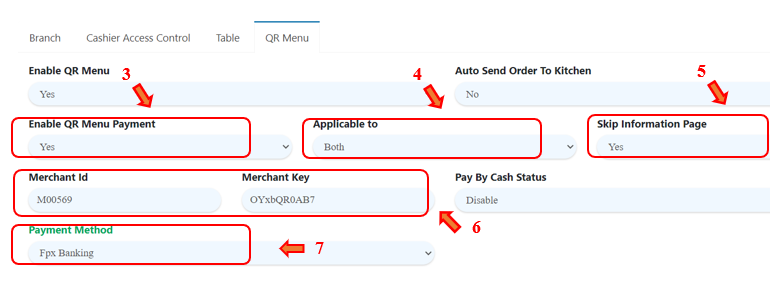
To enable this feature, follow the following steps:
- In Setting > Branch.
- Click on ‘QR Menu’.
- Set ‘Enable QR Menu Payment’ to ‘Yes’.
- Choose ‘Applicable to‘.
- Choose ‘Skip Information Page‘.
- Fill in ‘Merchant Id‘ and ‘Merchant Key‘.
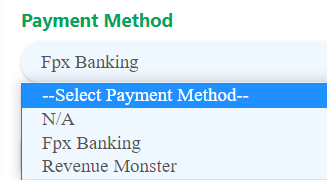
- Select Fpx Banking or Revenue Monster as QR Menu payment method.(Revenue Monster payment method will be made available soon.)
- Click ‘Save’ once it is done. Don’t forget to sync on BIG POS Pro application.
How to enable QR Menu Payment (Singapore)?
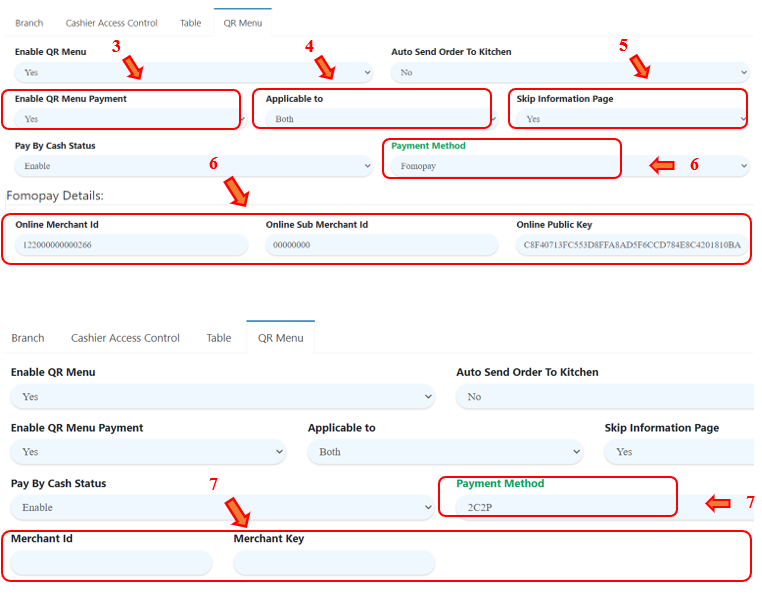
To enable this feature, follow the following steps:
- In Setting > Branch.
- Click on ‘QR Menu’.
- Set ‘Enable QR Menu Payment’ to ‘Yes’.
- Choose ‘Applicable to‘.
- Choose ‘Skip Information Page‘.
- If select Fomopay as payment method, then fill in ‘Online Merchant Id‘, ‘Online Sub Merchant Id‘ and ‘Online Public Key‘.
- If select 2C2P as payment method, then fill in ‘Merchant Id‘ and ‘Merchant Key‘.
- Click ‘Save’ once it is done. Don’t forget to sync on BIG POS Pro application.