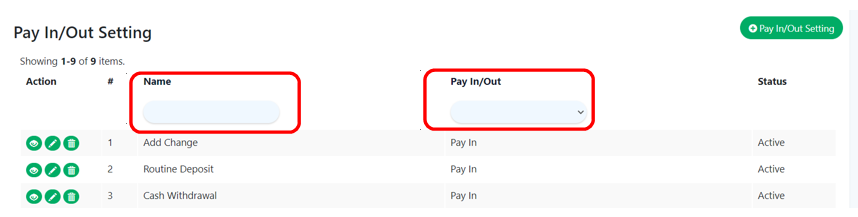
Pay In/Out Setting – Main Page
Introduction
Without a sale being completed, a pay in occurs when money is deposited in the cash drawer. If money is taken out of the cash drawer without a sale taking place, this is known as a pay out. This section introduces how to access Pay In/Out Setting main page.
How to enter the ‘Pay In/Out Setting’ main page?
To enter ‘Pay In/Out Setting’ main page, follow the following steps:
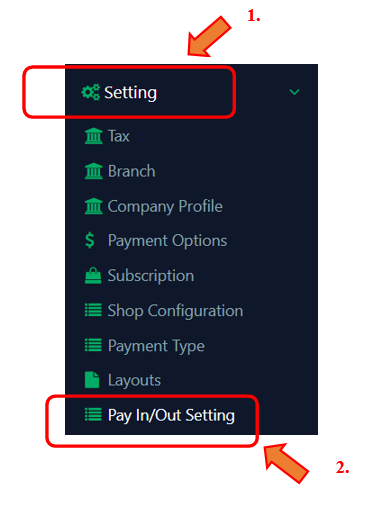
1. Click ‘Settings’ on the left side panel.
2. Click ‘Pay In/Out Setting’ from the dropdown menu, then you can view all of the created pay in/out reasons.
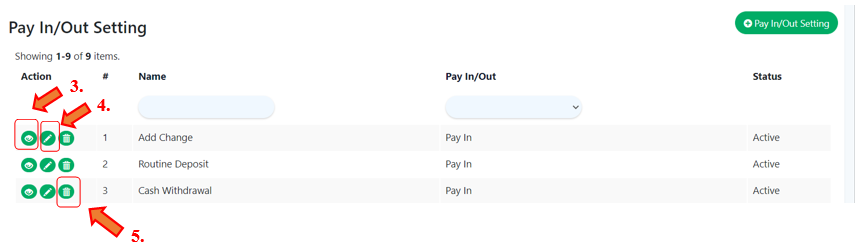
3. At the ‘Action’ column, click ‘ ’ to view any created pay in/out reason.
4. Click ‘ ’ to update a pay in/out reason if you want to modify it.
5. Click ‘ ’ to delete a pay in/out reason if you no longer using it.
How to filter ‘Pay In/Out Setting’?
To search a pay in/out setting, there are two choices available for filter usage which are pay in/out reason name and pay in/out reason type.