How Can We Help?
Pay In/Out Setting – Create Pay In/Out Reason
Introduction
This section introduces how to create a new Pay In/Out reason.
How to create a ‘Pay In/Out Reason’?
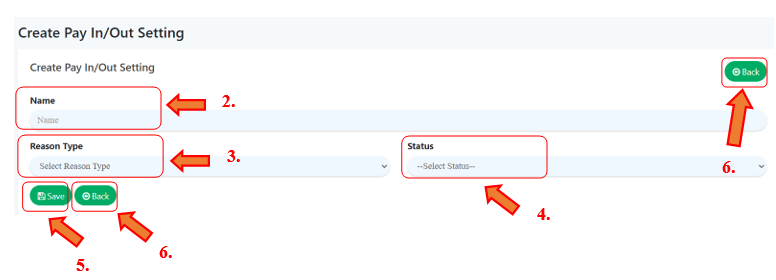
To create an ‘Pay In/Out Reason‘, follow the following steps:
- On the right side of the ‘Pay In/Out Setting’ main page, click on ‘
 ’ to create a new pay in/out reason.
 - Fill in required details ‘Name’, give a unique name to pay in/out reason.
- Choose which ‘Reason Type’ to be assign with this pay in/out reason using dropdown menu.
- Indicate ‘Status’.
- Click ‘
 ’ to save all details.
 - Click ‘
 ’ to redirect back to ‘Pay In/Out Setting’ main page.