How Can We Help?
Lite layout in horizontal view
Introduction
New display layout options have been included specifically for the BIGPOS Lite (Android & iOS) to improve functionality and more user friendly .
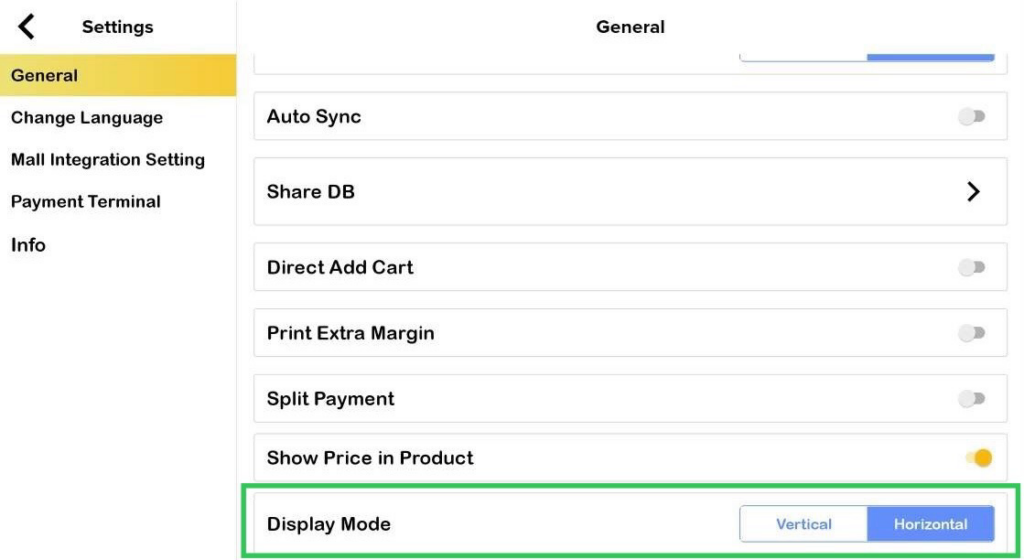
Additional settings – Display mode
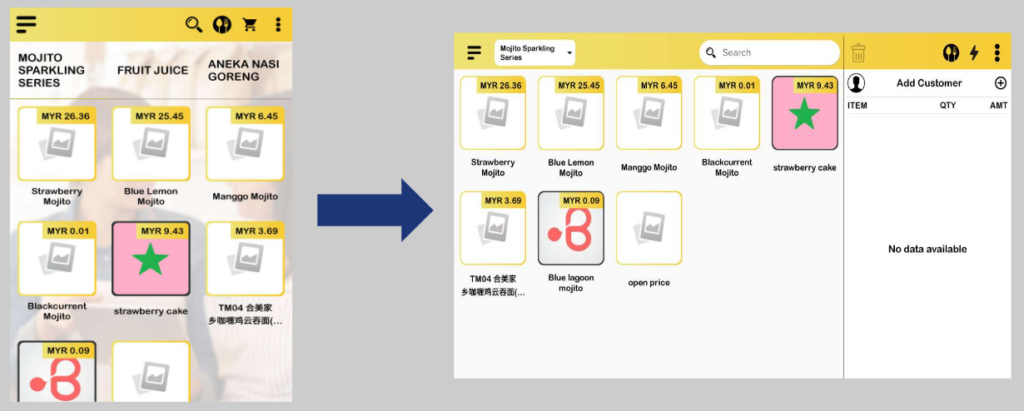
This settings is added in general settings Lite apps . The user has the option to change between horizontal or vertical display modes, but only on specific devices.
Android layout
All Android devices had a vertical default layout before additional settings being added. This additional settings only applied for Android tablet device as shown in table below.
| Screen Size | Type | New Display Mode settings | Default layout | Example device |
| > 7 inch | Android | ✔ | Horizontal | Android tablet |
| < 7 inch | Android | ✖ | Vertical | Android phone |
| > 7 inch | Imin | ✖ | Horizontal | Imin D4, Imin Falcon |
| < 7 inch | Imin | ✖ | Vertical | Imin M2 Max |
iOS layout
Both iPad and iPhone have a vertical layout by default before new settings are added. Table below illustrates for which new display mode setting is applicable for iOS device.
| Screen Size | Type | New Display Mode settings | Default layout | Example device |
| > 7 inch | Apple | ✔ | Horizontal | iPad |
| < 7 inch | Apple | ✖ | Vertical | iPhone |