How Can We Help?
Ipad Layout – Main Page
Introduction
Ipad Layout is used to select products and process transactions, and what you will see on the app. We can prioritize hot selling items from top to bottom.
How to enter the ‘Ipad Layout’ main page?
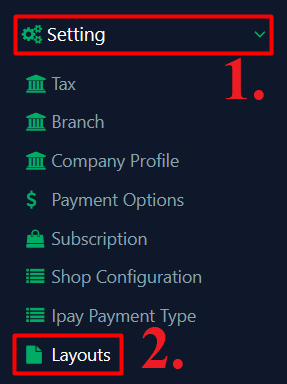
To enter ‘Ipad Layout’ main page, follow the following steps:
- Click ‘Settings’ on the left side panel.
- Click ‘Layouts’ from the dropdown menu, you will see all Ipad layouts.
- At the ‘Action’ column, click ‘
 ’ to update a layout if you want to modify
- Click ‘
 ’ to delete a layout if you no longer using the layout

How to filter ‘Ipad Layouts’?
To search a layout, follow the following steps:
- Enter anyone of the following-
- Branch
- Layout Name
- Layout Type
