How Can We Help?
Ipad Layout – Create Ipad Layout
Introduction
We can prioritize hot selling items from top to bottom by creating a layout that is useful and more efficient while using the POS system.
How to create an ‘Ipad Layout’?
To create an ‘Ipad Layout’, follow the following steps:
- On the right side of the ‘Ipad Layout’ main page, click on ‘
 ’ to add a layout.
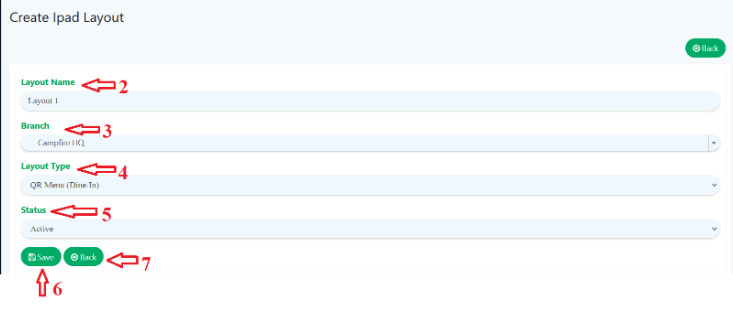
 - Fill in required details ‘Layout Name’, give a unique name to different layout.
- Choose which ‘Branch’ to be assign with this layout using dropdown menu.
- Choose ‘Layout Type’.
- Indicate ‘Status’.
- Click ‘
 ’ to save all details.
 - Click ‘
 ’ to redirect back to ‘Ipad Layout’ main page.
After ‘Update’ the layout, user is able to arrange the layout.
Click and hold it, then drag and drop the product within the layout and arrange to your preference.
Registered layout will be reflected in BIG POS Lite app once it is synced.