How to setup, check commission reports, and use the commission system in BIGPOS Pro App?
Introduction
This post will assist you how to setup, use commission system in BIGPOS Pro App and check commission report in web admin.
How to setup commission system in web admin?
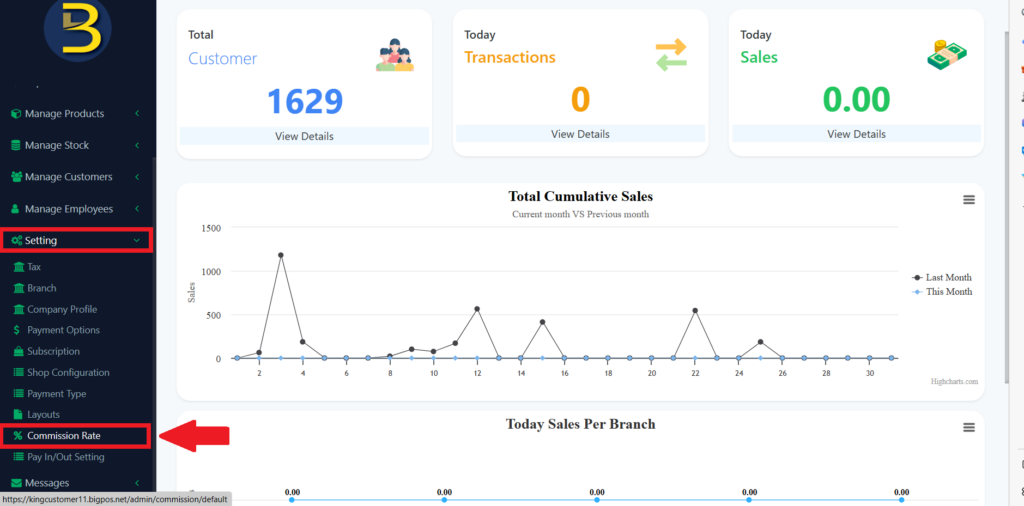
1. Firstly, you need go to “Setting“, then choose “Commission Rate“.
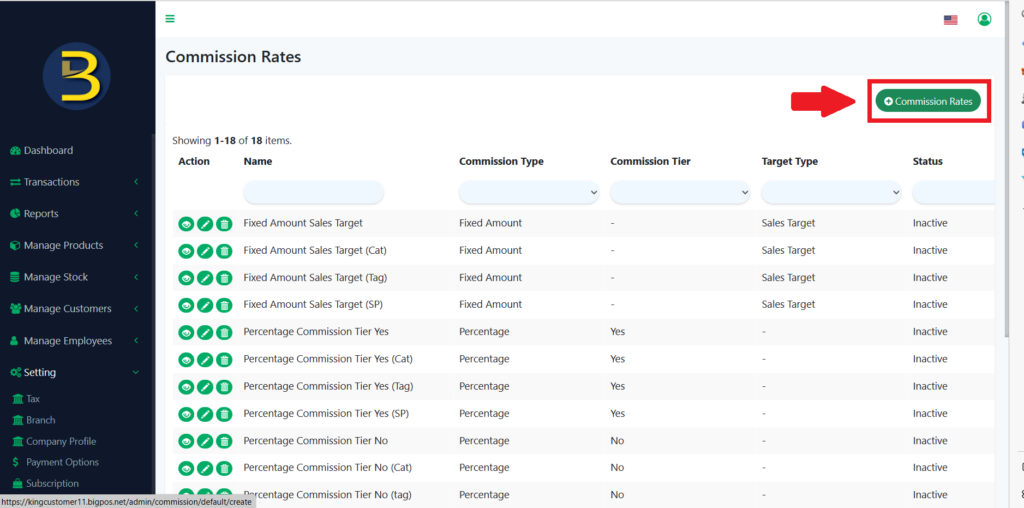
2. After that, you need to create new commission rate by choosing the “+ Commission Rates” button if you don’t have any or you can edit exist commission setting in this page.
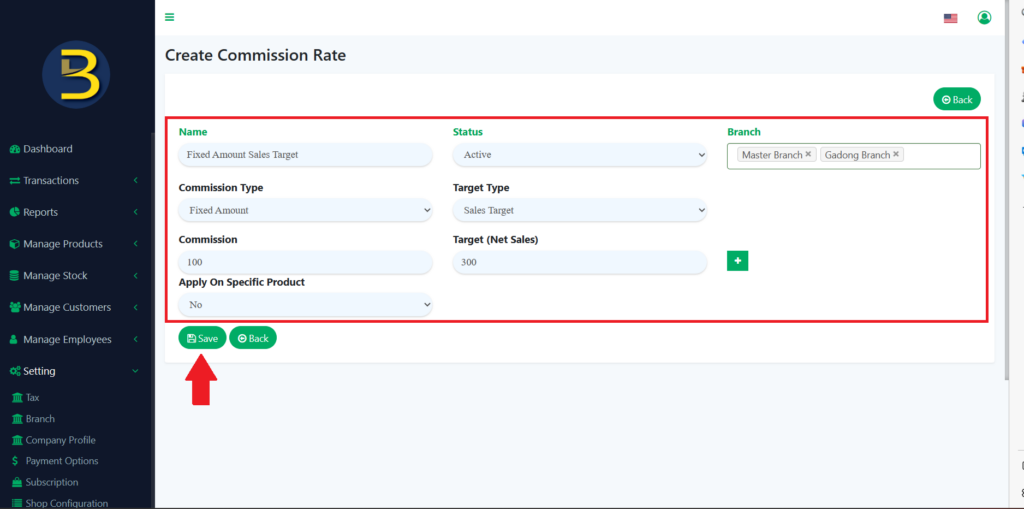
3. After that, there are two types of commission which is “Fixed amount” and “Percentage“. You can create any type of commission rate in this page and lastly is to select on “Save” button. As you can see, I had set fixed amount. If sales target reaches MYR300 Net Sales, the staff will earn MYR100 commission.
How to use commission system in BIGPOS Pro App?
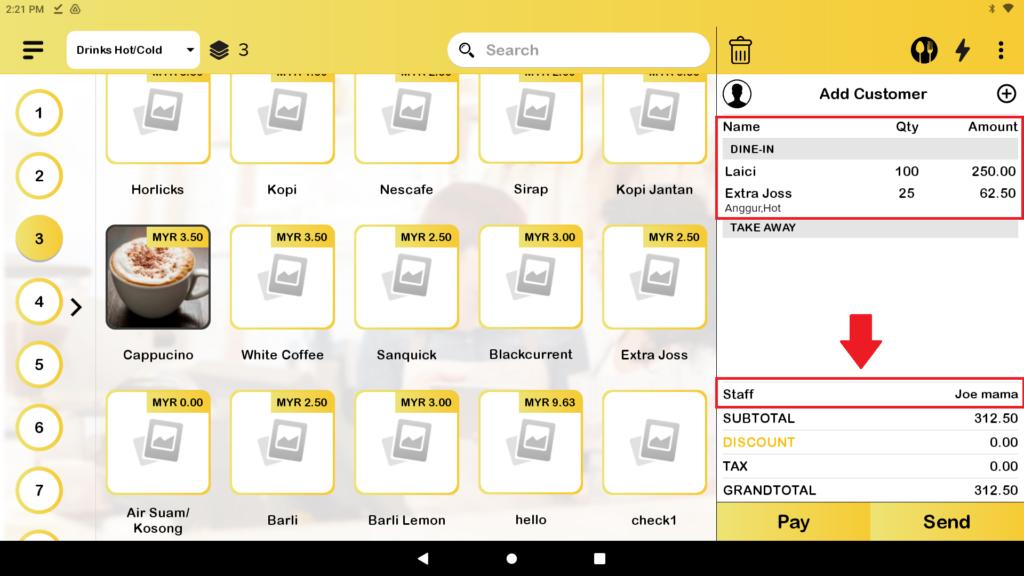
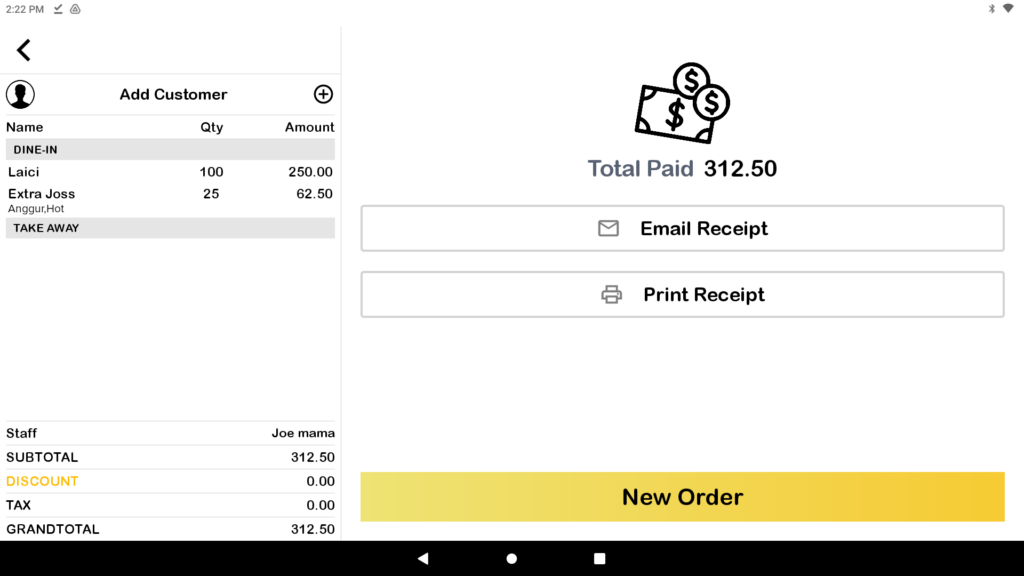
1. First, you need to add some orders in cart, and you will saw Staff. The commission will apply for the Staff.
2. After that, you need to finish the payment and please remember to sync data. The commission report can be view at the web admin. (How to view report at web admin will be on page below.)
How to check commission report at web admin?
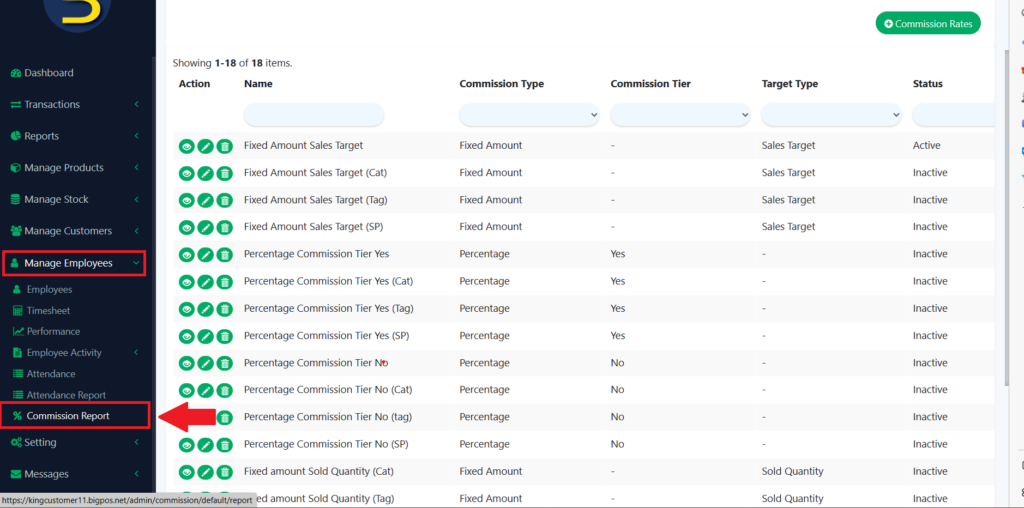
1. First, you need select “Manage Employees“, then select “Commission Report“.
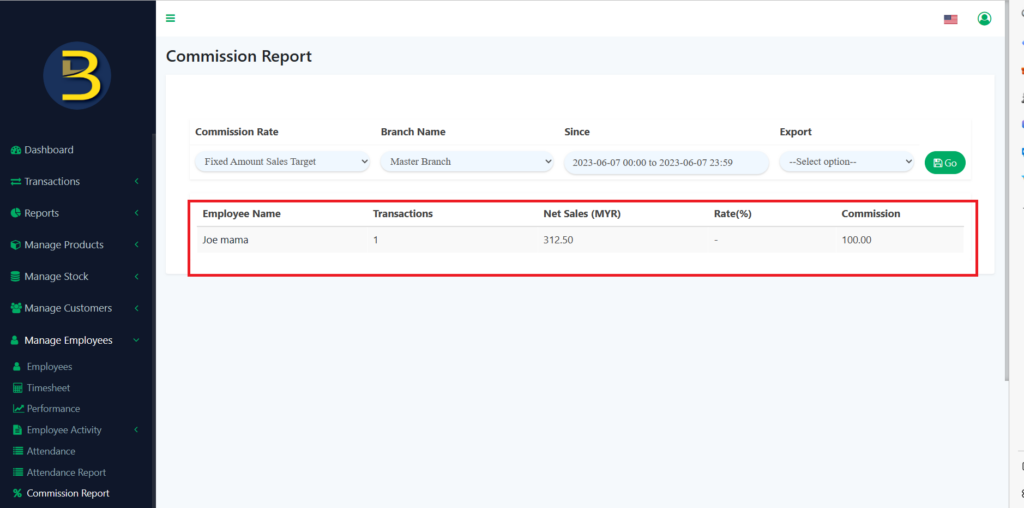
2. Then, you can use filter to search which type of commission rate, branch name, date that you want to search. As you can see, the employee had performed one transaction more than MYR300 Net Sales , and the commission for that employee is MYR100.
Notes: QR Menu order will not included in commission system since order made by customer itself.
18 Types of commission rate settings.
1. Fixed Amount Sales Target
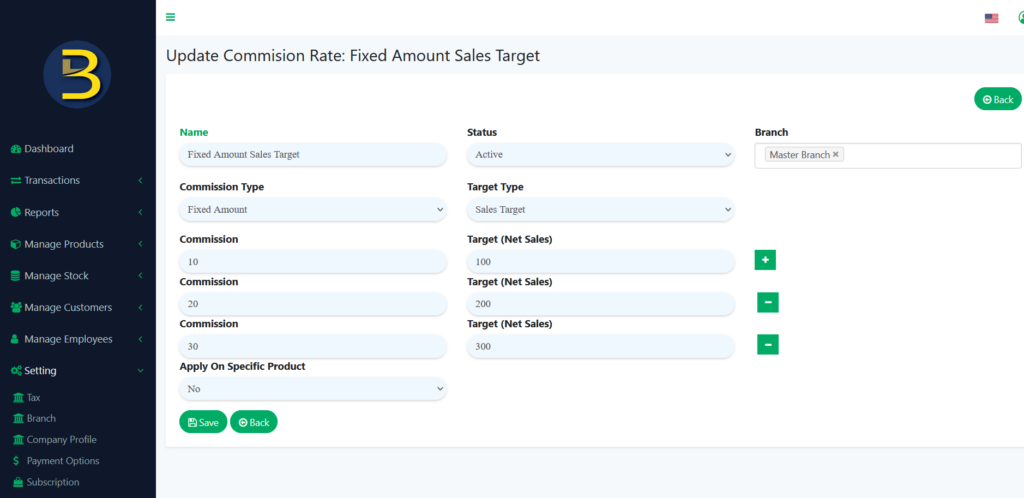
This commission type is a Fixed Amount and it applies to all products. If the sales target reaches MYR100 Net Sales, the staff will earn MYR10 commission. If the sales target reaches MYR200, the staff will earn MYR20 as commission, etc. The commission only can claim only once for each section and the maximum sales target is MYR300 Net Sales, and the total amount of commission is MYR30 based on the image above.
2. Fixed Amount Sales Target (Product on Category)
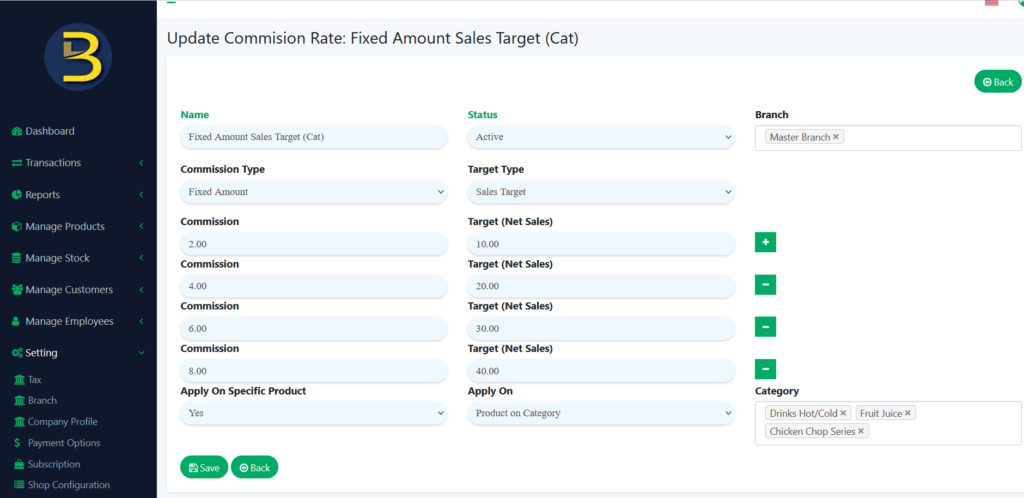
This commission type is a Fixed Amount and It’s only applied to products in the category. You can set which product on the category you like to apply for this commission setting. If the sales target reaches MYR10 Net Sales, the staff will earn MYR2 commission. If the sales target reaches MYR20 Net Sales, the staff will earn MYR4 commission, etc. The commission only can claim only one section and the maximum sales target is MYR40 Net Sales, and the total amount commission is MYR8 based on the image above.
3. Fixed Amount Sales Target (Products with Tags)
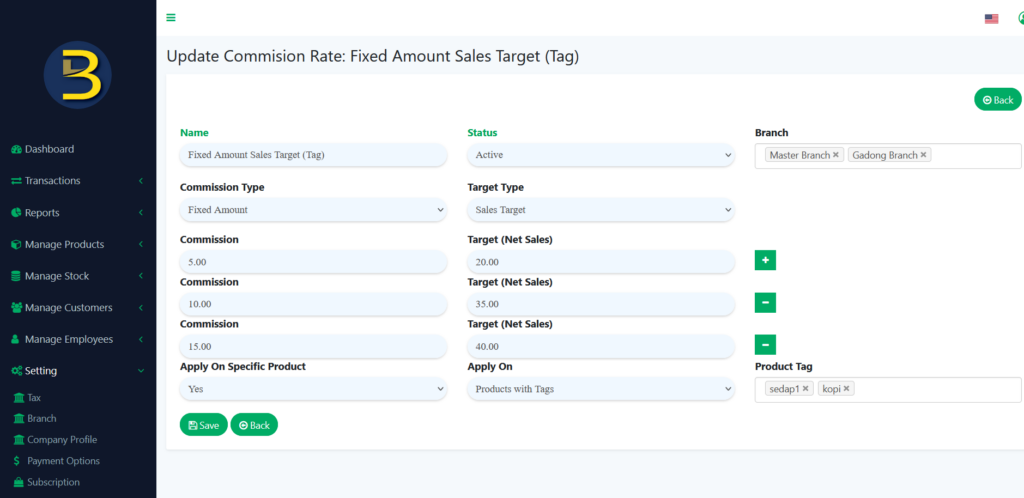
This commission type is a Fixed Amount and It’s only applied to products with tags. You can set which product tag you like to apply for this commission setting. If the sales target reaches MYR20 Net Sales, the staff will earn MYR5 commission. If the sales target reaches MYR35 Net Sales, the staff will earn MYR10 commission, etc. The commission only can claim only one section and the maximum sales target is MYR40 Net Sales, and the total amount commission is MYR15 based on the image above.
4. Fixed Amount Sales Target (Specific Product)
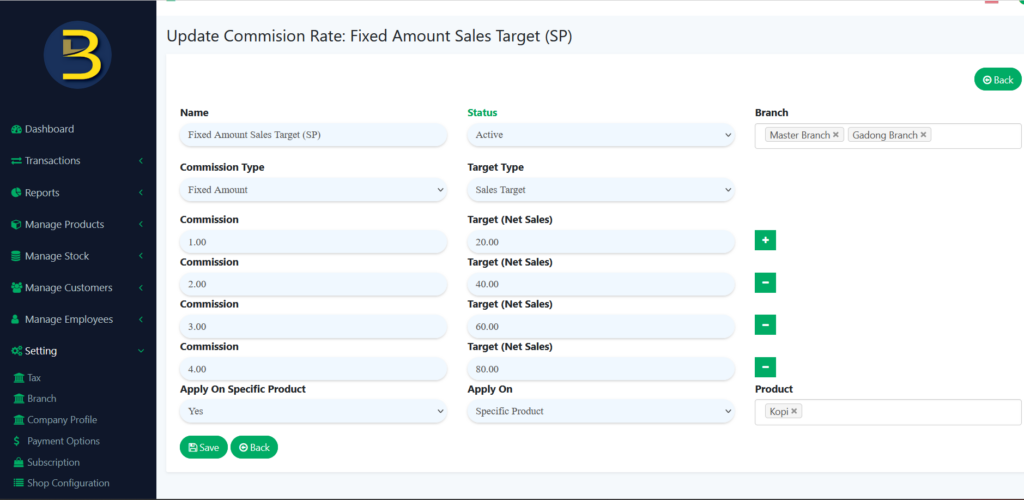
This commission type is a Fixed Amount, and it’s only applied to a specific product. You can set which specific product you like to apply for this commission setting. If the sales target reaches MYR20 Net Sales, the staff will earn MYR1 commission. If the sales target reaches MYR40 Net Sales, the staff will earn MYR2 commission, etc. The commission only can claim only once for each section and the maximum sales target is MYR80 Net Sales, and the total amount of commission is MYR4 based on the image above.
5. Percentage Commission Tier Yes
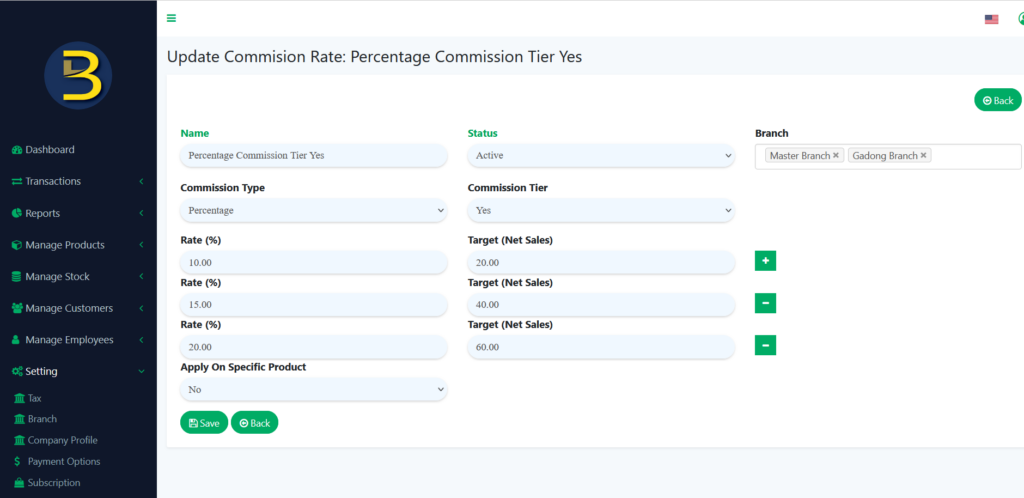
This commission type is a Percentage, Commission Tier is set as Yes, and it applies to all products. If the sales target reaches MYR20 Net Sales, the staff will earn a 10% commission. If the sales target reaches MYR40 Net Sales, the staff will earn 15% commission, etc. The commission can claim only once for each section and the maximum sales target is MYR60 Net Sales, and the commission is 20% based on the image above.
6. Percentage Commission Tier Yes (Product on Category)
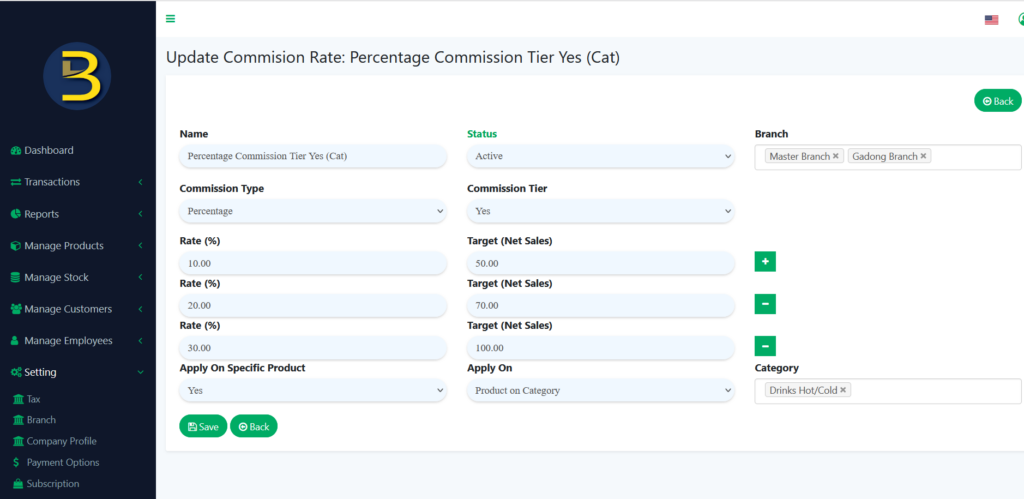
This commission type is a Percentage, Commission Tier is set as Yes, and It’s only applied to products on the category. You can set which category of product you like to apply for this commission setting. If the sales target reaches MYR50 Net Sales, the staff will earn a 10% commission. If the sales target reaches MYR70 Net Sales, the staff will earn 20% commission, etc. The commission can claim only once for each section and the maximum sales target is MYR100 Net Sales, commission is 30% based on the image above.
7. Percentage Commission Tier Yes (Products with Tags)
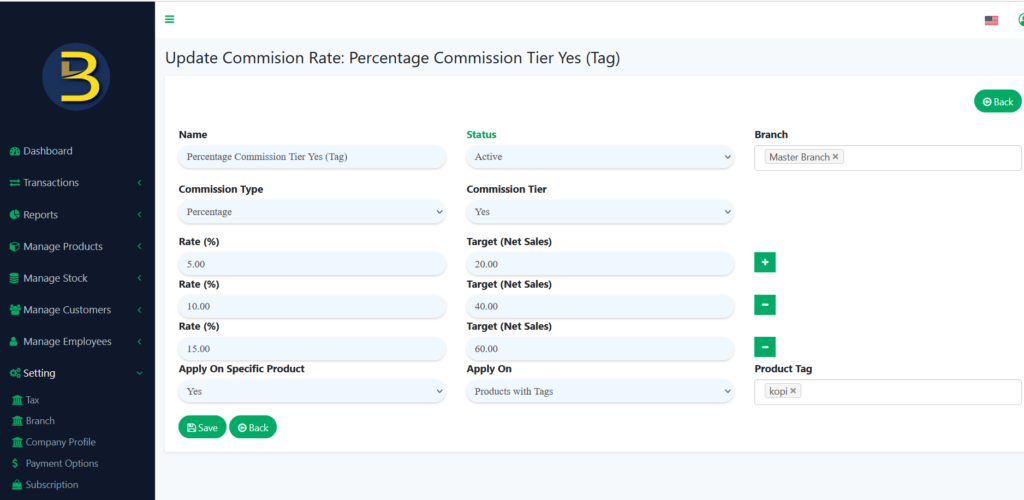
This commission type is a Percentage, Commission Tier is set as Yes, and it’s only applied to products with tags. You can set which product tag you like to apply for this commission setting. If the sales target reaches MYR20 Net Sales, the staff will earn a 5% commission. If the sales target reaches MYR40 Net Sales, the staff will earn 10% commission, etc. The commission can claim only once for each section and the maximum sales target is MYR60 Net Sales, commission is 15% based on the image above.
8. Percentage Commission Tier Yes (Specific Product)
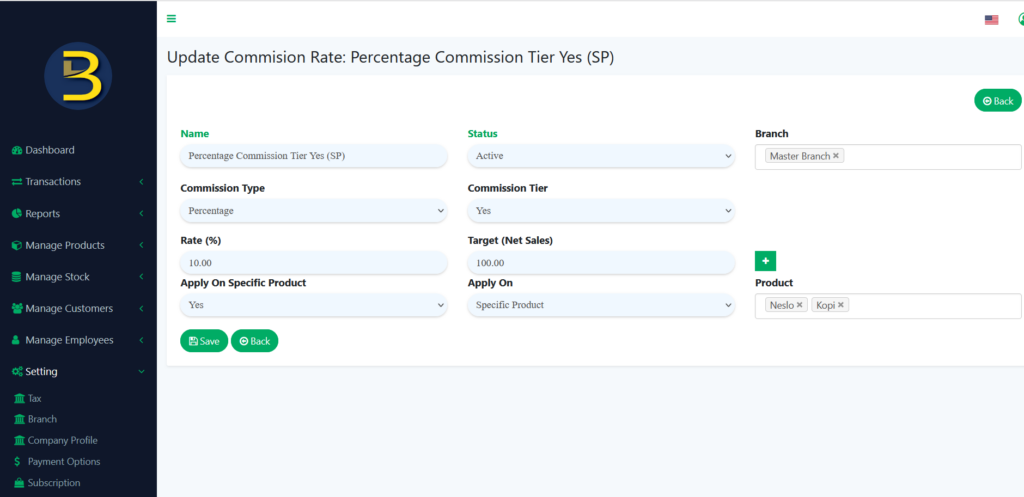
This commission type is a Percentage, Commission Tier is set as Yes and it’s only applied to a specific product. You can set which specific product you like to apply for this commission setting. If the sales target reaches MYR100 Net Sales, the staff will earn a 10% commission. You can add more commission rates by selecting the “+” button.
9. Percentage Commission Tier No
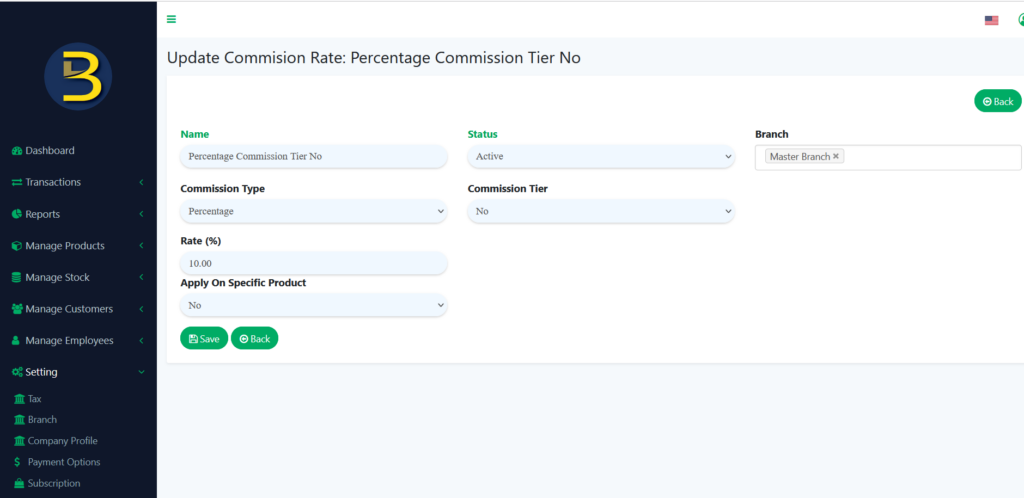
This commission type is a Percentage and it applies for all products because Apply On Specific Product set as No. The Commission Tier is set as No, which means no matter how much your net sales are, will get a 10% commission only.
10. Percentage Commission Tier No (Product on Category)
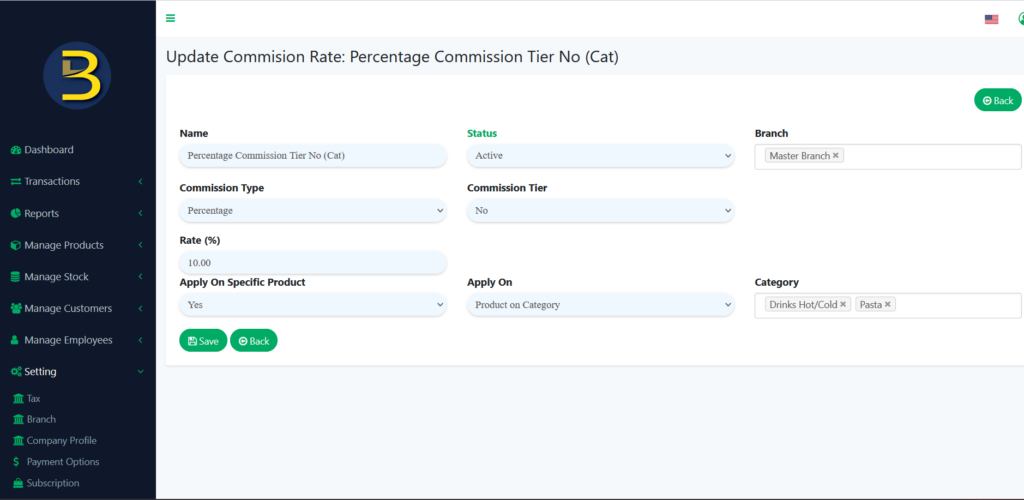
This commission type is a Percentage and it applies to products on category only. You can set which product on the category you like to apply for this commission setting. The Commission Tier is set as No, which means no matter how much your sales with the product on a category, will get a 10% commission only.
11. Percentage Commission Tier No (Products with Tags)
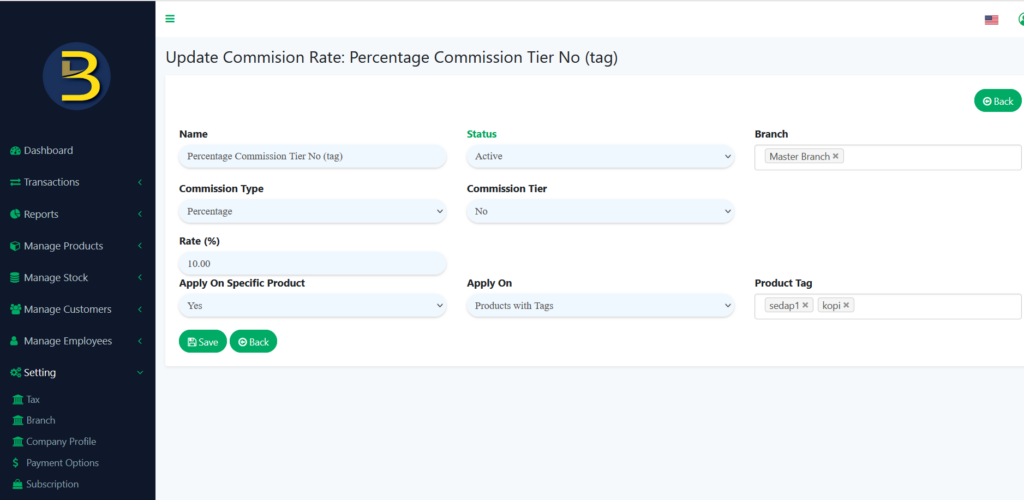
This commission type is a Percentage and it applies to products with tags only. You can set which product with tags you like to apply for this commission setting. The Commission Tier is set as No, which means no matter how much your sales with the product with tags, will get a 10% commission only.
12. Percentage Commission Tier No (Specific Product)
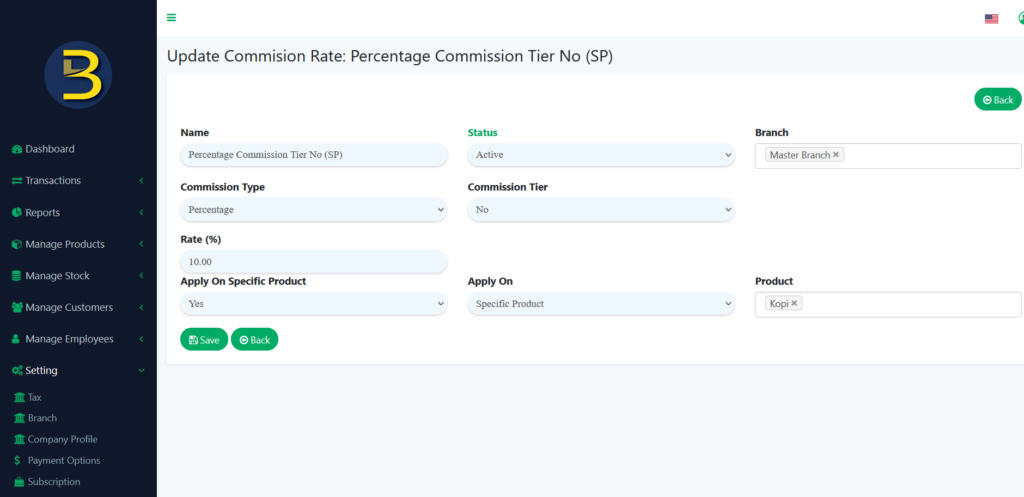
This commission type is a Percentage and it applies to specific products only. You can set which specific product you like to apply for this commission setting. The Commission Tier is set as No, which means no matter how much your sales with the specific product, will get a 10% commission only.
13. Fixed amount Sold Quantity (Product on Category)
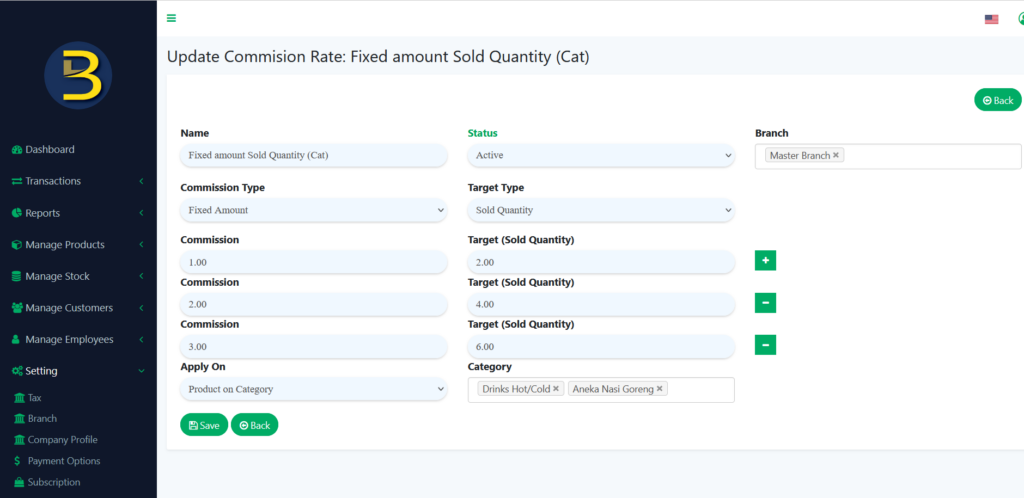
This commission type is a Fixed Amount, the target type is Sold Quantity, and it’s only applied to products on the category. You can set which product on the category you like to apply for this commission setting. If Sold Quantity reaches 2 quantities, the staff will earn MYR1 commission. If Sold Quantity reaches 4 quantities, the staff will earn MYR2 commission. etc. The commission can claim only once for each section and the maximum Sold Quantity is 6 quantities, and the commission is MYR3 based on the image above.
14. Fixed amount Sold Quantity (Products with Tags)
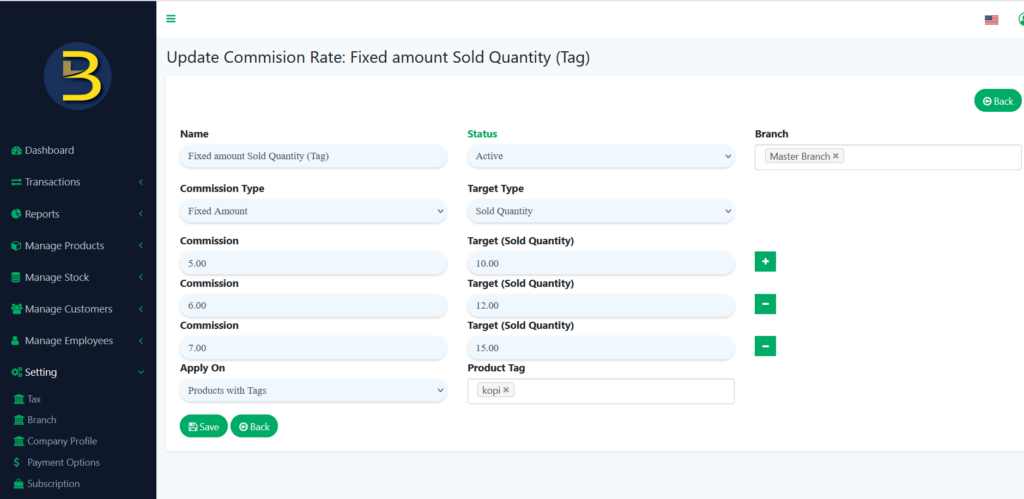
This commission type is a Fixed Amount, the target type is Sold Quantity, and it’s only applied to products with tags. You can set which product with tags you like to apply for this commission setting. If Sold Quantity reaches 10 quantities, the staff will earn MYR5 commission. If Sold Quantity reaches 12 quantities, the staff will earn MYR6 commission, etc. The commission can claim only once for each section and the maximum Sold Quantity is 15 quantities, and the commission is MYR7 based on the image above.
15. Fixed amount Sold Quantity (Specific Product)
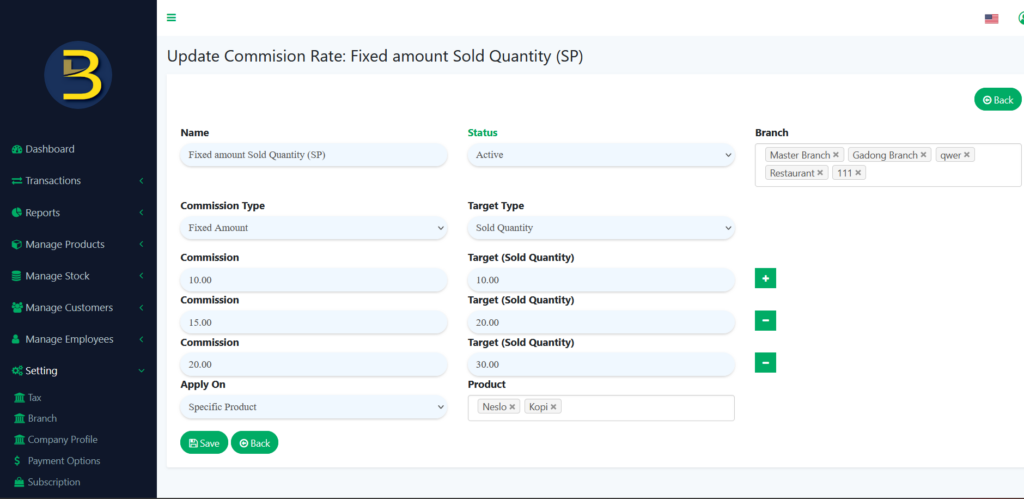
This commission type is a Fixed Amount, the target type is Sold Quantity, and it’s only applied to specific products. You can set which specific product you like to apply for this commission setting. If Sold Quantity reaches 10 quantities, the staff will earn MYR10 commission. If Sold Quantity reaches 20 quantities, the staff will earn MYR15 commission, etc. The commission can claim only once for each section and the maximum Sold Quantity is 30 quantities, and the commission is MYR20 based on the image above.
16. Fixed Amount Commission Per Quantity (Product on Category)
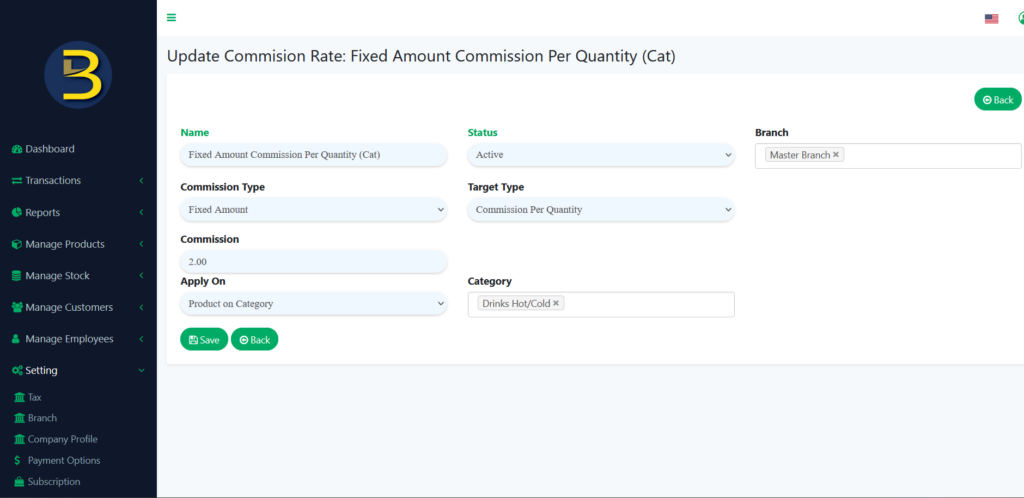
This commission type is a Fixed Amount, the target type is Commission Per Quantity, and it’s only applied to product on category. You can set which product on the category you like to apply for this commission setting. When the staff sold any product on category, will get the total amount of MYR2 as a commission for per quantity.
17. Fixed Amount Commission Per Quantity (Products with Tags)
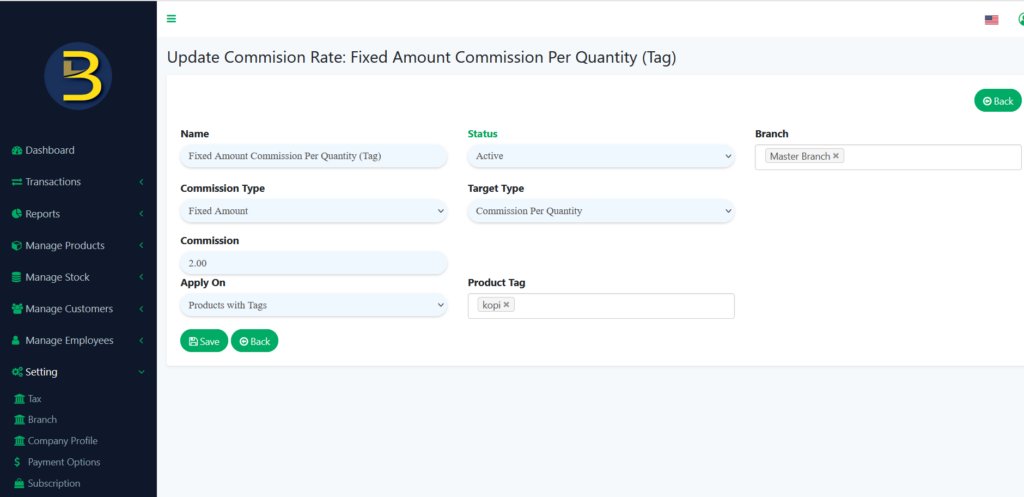
This commission type is a Fixed Amount, the target type is Commission Per Quantity, and it’s only applied to products with tags. You can set which product with tags you like to apply for this commission setting. When the staff sold any product with tags, will get the total amount of MYR2 as a commission for per quantity.
18. Fixed Amount Commission Per Quantity (Specific Product)
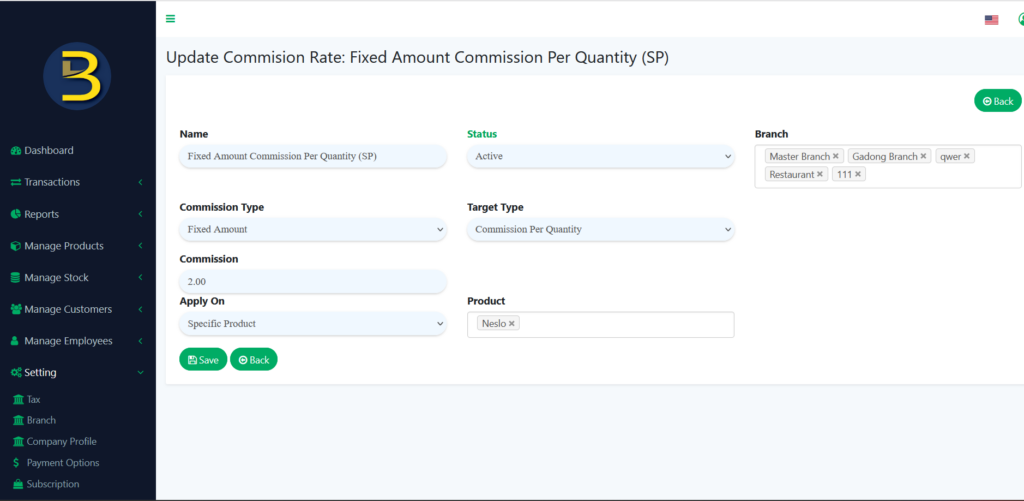
This commission type is a Fixed Amount, the target type is Commission Per Quantity, and it’s only applied to specific products. You can set which specific products you like to apply for this commission setting. When the staff sold any specific product, will get the total amount of MYR2 as a commission for per quantity.
Notes: You can add more commission rates by pressing the “+” button when it is in the target type of Sales Target, Sold Quantity, and Commission Tier set to YES.