How Can We Help?
Employees – Create Employees
Introduction
Employees’ particulars have to be recorded to ensure they have the same access to the BIG POS system within specified branches where they are being assigned a position. Employers need to establish a profile by registering new employees’ details.
How to ‘Create Employees’?
To enter ‘Create Employees’ page, follow the following steps:
- In ‘Employees’ main page, look for ‘
 ’ button on the upper right side of the search
 - Click on it and user will be redirected to ‘Create Employees’ page.
- Under Access Control, select the appropriate BackOffice access.
- Fill in required details, then click ‘
 ’ or ‘
 ’ to cancel.
 - Redirected back to ‘Employees’ page.

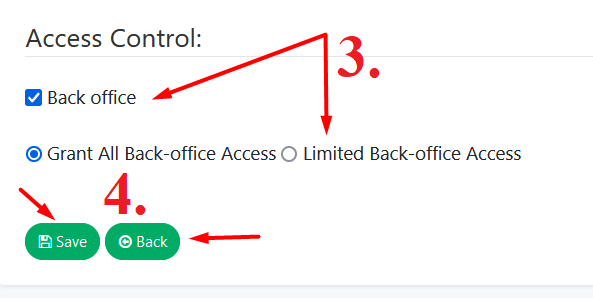
*BackOffice:
Select Grant all BackOffice Access this will give employees the ability to view and make changes in BackOffice.
Select Limit BackOffice Access to restrict them to how you want them to access.