How Can We Help?
Customer – Main Page
Introduction
Customers allows managing of the customers and monitoring of customers within the branches. This section introduces how to use the Customer feature in BIG POS Web Admin.
How to enter ‘Customer Main Page’?
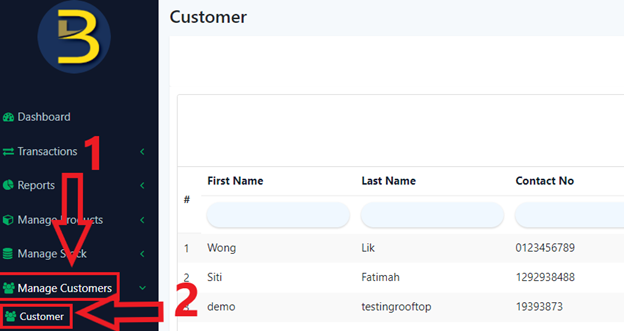
To enter the ‘Customer Main Page’, follow the following steps:
- Head over to ‘Manage Customers’ on the left side panel.
- Using the dropdown menu, proceed by clicking on ‘Customers’.
How to search ‘customer’?
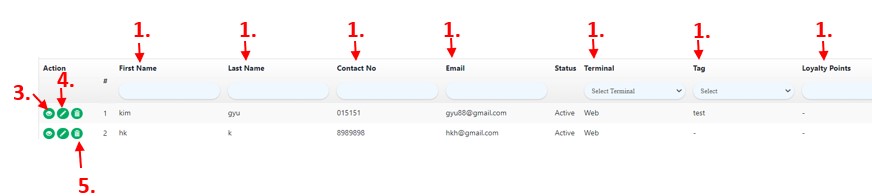
- Filter using First Name, Last Name, Contact Number, Email, Terminal, Tag or Loyalty Points.
- Enter either one in the search box.
- Click ‘
 ’ to view customer’s profile.
 - Click ‘
 ’ to update customer’s details.
 - Click ‘
 ’ to delete an customer’s profile.
How to export customer data?
The customer data can be exported into CSV format (Comma-separated values), please click the below icon to proceed.

Example of data in CSV format:
