How Can We Help?
Attendance – Main Page
Introduction
Attendance allows monitoring of employees’ attendance within a specific date which includes their check in time and check out time. This section introduces how to use the Attendance feature in BIG POS Web Admin.
Prerequisite for Using Attendance
- To use the ‘Attendance’ feature, each registered employee must sign in to BIG POS Lite or Pro version with their respective employee PIN so that record will be saved according to the PIN provided.
- The user must enable attendance system within the company profile of BIG POS Web Admin.
How to enter ‘Attendance Main Page’?
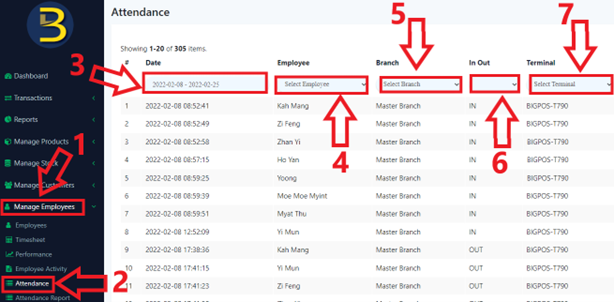
To enter the ‘Attendance Main Page’, follow the following steps:
- Head over to ‘Manage Employees’ on the left side panel.
- Using the dropdown menu, proceed by clicking on ‘Attendance’.
- Specifies the date range to be inspected.
- Select which employee to be inspected. (Optional)
- Specifies whether to limit the attendance to be queried according to branch in the ‘Branch’ input. (Optional)
- Specifies whether to limit the attendance to be queried according to check in or check out in the ‘In Out’ input. (Optional)
- Specifies whether to limit the attendance to be queried according to terminal in the ‘Terminal’ input. (Optional)
- Sample output is shown below.